wellbee API
Documentation was generated on 2026-09-17T14:18:11.111Z
Table of contents
Http endpoints
admin
audit
auth
bankid
bulletin-board
- DELETE to /bulletin-board/day/:groupId/:date
- DELETE to /bulletin-board/device/:id
- GET to /bulletin-board/day/:groupId/:date
- GET to /bulletin-board/device/registration
- GET to /bulletin-board/devices/:groupId
- GET to /bulletin-board/image/:lat/:lng
- GET to /bulletin-board/image/:lat/:lng/hash
- GET to /bulletin-board/information/:groupId/:date/:lat/:lng
- GET to /bulletin-board/preview/:groupId/:date
- POST to /bulletin-board/day/:groupId/:date
- POST to /bulletin-board/device
- POST to /bulletin-board/device/activate
- POST to /bulletin-board/device/registration
clothes
clothing
contact
dev
event
- DELETE to /event/:id
- DELETE to /event/recurring/:recurringEventId/all
- DELETE to /event/recurring/:recurringEventId/future
- DELETE to /event/recurring/:recurringEventId/one
- GET to /event/:id
- POST to /event
- POST to /event/:id/cancel
- POST to /event/:id/done
- POST to /event/:id/progress
- POST to /event/:id/stop-alarm
- POST to /event/recurring
- POST to /event/recurring/cancel/:recurringEventId/all
- POST to /event/recurring/cancel/:recurringEventId/future
- POST to /event/recurring/cancel/:recurringEventId/one
- PUT to /event/:id
- PUT to /event/recurring/:recurringEventId/all
- PUT to /event/recurring/:recurringEventId/future
- PUT to /event/recurring/:recurringEventId/one
file-service
freja
group
groups
invite
item
languages
license
- GET to /license
- GET to /license/:id
- GET to /license/:id/organisations
- GET to /license/current-subscription
- GET to /license/invoice/:id
- GET to /license/organisation/:id/invoices
- GET to /license/public
- POST to /license
- POST to /license/:id/deactivate
- POST to /license/:id/subscribe
- POST to /license/subscription/:id/unsubscribe
- PUT to /license/organisation/:id/switch-license
- PUT to /license/subscription/:id/payment-method
license-admin
list
lists
logbook
media-library
message
news
notes
notifications
organisation
organisation-admin
photo-diary
pictograms
planner
public
reset-password
staff
staffs
subscription-updates
template
unique-mail
user
- DELETE to /user
- DELETE to /user/:id
- DELETE to /user/:userId/planner
- GET to /user
- GET to /user/:id
- GET to /user/:id/event
- GET to /user/emails
- GET to /user/search
- GET to /user/video-contacts
- POST to /user
- POST to /user/:id/invite-planner
- POST to /user/activate-bank-id-login/:userId
- POST to /user/deactivate-bank-id-login/:userId
- POST to /user/resend-verification/:email
- POST to /user/verify/:tokenId
- PUT to /user
- PUT to /user/:id/details
- PUT to /user/:userId/planner/:plannerId
- PUT to /user/update-password
video
video-call
wb-pictograms
Service endpoints
audit-service
auth-service
- auth-service.decode-token
- auth-service.generate-jwt-token-for-user.app
- auth-service.generate-jwt-token-for-user.cookie
- auth-service.generate-jwt-token-for-user.token
- auth-service.generate-jwt-token-for-user.web
- auth-service.get-session-details-by-user-id
- auth-service.logout-users-by-id
- auth-service.refresh-token
bank-id-service
contact-service
event-service
fruster-stripe-service
- fruster-stripe-service.charge
- fruster-stripe-service.create-account
- fruster-stripe-service.create-customer
- fruster-stripe-service.create-payment-method-intent
- fruster-stripe-service.create-plan
- fruster-stripe-service.create-product
- fruster-stripe-service.create-subscription
- fruster-stripe-service.get-customer
- fruster-stripe-service.get-invoice
- fruster-stripe-service.get-invoices
- fruster-stripe-service.get-payment-method
- fruster-stripe-service.get-payment-methods
- fruster-stripe-service.get-subscription
- fruster-stripe-service.get-subscriptions
- fruster-stripe-service.get-upcoming-invoice
- fruster-stripe-service.refund
- fruster-stripe-service.unsubscribe
- fruster-stripe-service.update-account
- fruster-stripe-service.update-customer
- fruster-stripe-service.update-subscription
fruster-web-bus
interceptor
list-service
mail-service
message-service
password-reset-service
pub
push-service
schedule-service
user-service
- user-service.add-roles
- user-service.create-user
- user-service.delete-user
- user-service.delete-users-by-query
- user-service.get-by-aggregate
- user-service.get-profiles-by-query
- user-service.get-scopes
- user-service.get-user
- user-service.get-users-by-aggregate
- user-service.get-users-by-query
- user-service.remove-roles
- user-service.resend-verification
- user-service.set-password
- user-service.update-password
- user-service.update-profile
- user-service.update-user
- user-service.validate-password
- user-service.verify-email
video-service
wb-bulletin-board-service
wb-event-service
wb-file-service
wb-license-service
- wb-license-service.get-by-query
- wb-license-service.get-current-subscription
- wb-license-service.get-organisation-license
- wb-license-service.get-upcoming-invoice
- wb-license-service.handle-subscription-updates
- wb-license-service.subscribe-to-license
- wb-license-service.unsubscribe
- wb-license-service.update-subscription
wb-media-library-service
wb-organisation-service
wb-photo-diary-service
wb-translation-service
wb-user-service
wb-video-service
Http endpoints
admin
DELETE to /admin/user/:id
from wb-fruster-user-service.2693d0b0Deletes a user. Response has status code 200 if successful. pub.user-service.user-deleted is published after deletion
GET to /admin/user
from wb-fruster-user-service.2693d0b0Gets users. Response has status code 200 if successful. Note that any query params will be used as a mongo query.
GET to /admin/user/:id
from wb-fruster-user-service.2693d0b0Gets user by id. Response has status code 200 if successful.
POST to /admin/user
from wb-fruster-user-service.2693d0b0Creates a fruster user. Must include a few base fields but can contain any number of custom fields. Response has status code 201 if successful. Automatically splits data between user and profile if configured to.
PUT to /admin/user/:id
from wb-fruster-user-service.2693d0b0Updates a user. Can contain any number of custom fields. Response has status code 200 if successful.
audit
GET to /audit/:userId
from wb-fruster-audit-service.4cb07e64Gets audit logs for a specific user. The result is sorted on timestamp. Supports pagination.
auth
* to /auth/logout
from wb-auth-service.385eaf77Will return a Set-Cookie to instruct browser to expire any existing cookie and delete the session of the token (from cookie or Authorization Bearer-header) from the database. Should be used by both Token and Cookie.
Note: When using the query param logoutId the id is obtained from GET to /auth/active-sessions which can only be done by the logged in user.
GET to /auth/active-sessions
from wb-auth-service.385eaf77Gets all active sesssions for the logged in user, typically to be used to list sessions similar to something like google or facebook with the ability to logout any session:
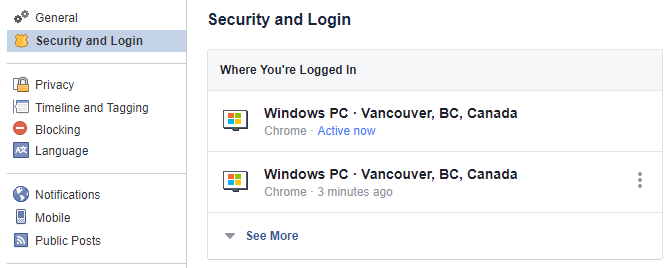
Will return all values as null (expect for id) if user hasn't been active since the session details functionality was implemented (sometime around 2020-06-11).
POST to /auth/disable-tfa/sms
from wb-auth-service.385eaf77Disables Two Factor Authentication via SMS for the user. Will remove the sms from the user's two factor authentication methods.
POST to /auth/enable-tfa/sms
from wb-auth-service.385eaf77Enables Two Factor Authentication via SMS for the user. Will send a SMS to the provided phone number with a code that the user needs to input to enable TFA. The code is valid for 10 minutes.
POST to /auth/refresh
from wb-auth-service.385eaf77Gets a fresh access token by providing a refresh token.
POST to /auth/token
from wb-auth-service.385eaf77Login for non web devices such as native mobile apps. Returns an access token to be used as bearer authentication. Response body also contains profile which has the same data as user-service.get-users-by-query with expand: "profile" but for the logged in user.
POST to /auth/verify-tfa/sms
from wb-auth-service.385eaf77Verifies the Two Factor Authentication code sent to the user via SMS. Will return a Set-Cookie with the new session token if the code is correct. The code is valid for 10 minutes.
bankid
GET to /bankid/collect/:type/:orderRef
from wb-bankid-service.1e25690dCollects status and returns qr code. Returns status 202 while order is pending, and status 200 when complete, along with completionData
POST to /bankid/auth
from wb-bankid-service.1e25690dInitiates a BankID login. Will return details so client can either autostart bankid application or render a qr code which will be scanned from other device running BankID application.
POST to /bankid/sign
from wb-bankid-service.1e25690dInitiates a BankID sign order. Will return details so client can either autostart bankid application or render a qr code which will be scanned from other device running BankID application.
bulletin-board
DELETE to /bulletin-board/day/:groupId/:date
from wb-bulletin-board-service.532fc398Delete the bulletin board information for a specific date
DELETE to /bulletin-board/device/:id
from wb-bulletin-board-service.532fc398Delete a bulletin board device
GET to /bulletin-board/day/:groupId/:date
from wb-bulletin-board-service.532fc398Getting a bulletin board inforamtion for a specific day
GET to /bulletin-board/device/registration
from wb-bulletin-board-service.532fc398Check status of a TV registration, used from TV-app
GET to /bulletin-board/devices/:groupId
from wb-bulletin-board-service.532fc398List devices for a specific group
GET to /bulletin-board/image/:lat/:lng/hash
from wb-bulletin-board-service.532fc398Get current hash value of the data that should be shown on the bulletin board
GET to /bulletin-board/information/:groupId/:date/:lat/:lng
from wb-bulletin-board-service.532fc398Get all information about a bulletin board screen for a specific day
GET to /bulletin-board/preview/:groupId/:date
from wb-bulletin-board-service.532fc398TODO: Add description
POST to /bulletin-board/day/:groupId/:date
from wb-bulletin-board-service.532fc398Update the information on a bulletin board for a specific date
POST to /bulletin-board/device
from wb-bulletin-board-service.532fc398Create a new BulletinBoardDevice
POST to /bulletin-board/device/activate
from wb-bulletin-board-service.532fc398Activate a device. Used from TV-app
POST to /bulletin-board/device/registration
from wb-bulletin-board-service.532fc398Used from TV-app to initiate a TV registration and generate a registration code
clothing
POST to /clothing/weather
from wb-clothes-service.a0de8a51Create a clothing for weather and returns created clothing details
dev
POST to /dev/test-notifications
from wb-service.70c54061Starts a notification test program. Will during every minute for 10 minutes send notifications.
event
DELETE to /event/:id
from wb-event-service.9e175b8bDeletes a calendar event by id. Permission: user for event, admin planner for user or planner with event permissions for user.
DELETE to /event/recurring/:recurringEventId/all
from wb-event-service.9e175b8bDeletes all recurring events in a series. Aka delets the recurring event entry.
DELETE to /event/recurring/:recurringEventId/future
from wb-event-service.9e175b8bdeletes all future recurring event in a series. It sets the stopRecurring date of the recurrence event to the startDate of the event being deleted; preventing more events from being generated in the future.
DELETE to /event/recurring/:recurringEventId/one
from wb-event-service.9e175b8bDeletes one recurring event in a series. The recurring series will ignore the deleted event's original startDate and endDate and not add anything there.
GET to /event/:id
from wb-event-service.9e175b8bGets a calendar event (calendar events & recurring event instances) by id. Permission: user for event, admin planner for user or planner with event permissions for user.
POST to /event
from wb-event-service.9e175b8bCreates a calendar event. Permission: user for event, admin planner for user or planner with event permissions for user.
POST to /event/:id/cancel
from wb-event-service.9e175b8bCancels a calendar event by id. Permission: user for event, admin planner for user or planner with event permissions for user.
POST to /event/:id/progress
from wb-event-service.9e175b8bSaves progress of an event list items. Sample request json :- { listId1: [itemId1, itemId2], listId2: [itemId3] }
POST to /event/:id/stop-alarm
from wb-service.70c54061Stop alarm for an event, will set lastSnoozedReminder to current date so that repeat alarms are not sent
POST to /event/recurring
from wb-event-service.9e175b8bConverts a normal event to a recurring event. The recurring event will repeat according to the inputted ruleset until the inputted stopRecurring date.
POST to /event/recurring/cancel/:recurringEventId/all
from wb-event-service.9e175b8bCancel all recurring event in a series.
POST to /event/recurring/cancel/:recurringEventId/future
from wb-event-service.9e175b8bCancel all future recurring event in a series.
POST to /event/recurring/cancel/:recurringEventId/one
from wb-event-service.9e175b8bCancel one recurring event in a series.
PUT to /event/:id
from wb-event-service.9e175b8bUpdates a calendar event by id. Permission: user for event, admin planner for user or planner with event permissions for user.
PUT to /event/recurring/:recurringEventId/all
from wb-event-service.9e175b8bUpdates all recurring events in a series. Aka updates the recurring event entry.
PUT to /event/recurring/:recurringEventId/future
from wb-event-service.9e175b8bUpdates all future recurring event in a series. It sets the stopRecurring date of the recurrence event to the startDate of the event being updated. Then a new recurring event is created with its startDate as the same as the previous stopRecurring and the stopRecurring of the original recurring event.
PUT to /event/recurring/:recurringEventId/one
from wb-event-service.9e175b8bUpdates one recurring event in a series. It creates a new standard event out of that particular event and decouples it from the recurring series. The recurring series will ignore the created event's original startDate and endDate and not add anything there; even if the created event is moved (time wise).
file-service
POST to /file-service/upload
from wb-file-service.d7c8adc2Uploads a file. Uses multipart data with the file to be uploaded as a form field called 'file'. Max file size is 50 mb. Returns status code 201 on success.
PUT to /file-service/image/:imageName
from wb-file-service.d7c8adc2Updates image width, height and/or rotation. Will process images and save in S3.
invite
GET to /invite/:id
from wb-user-service.ae3d6123Gets an invite by id. Only if an invite is returned, a new planner can be created.
languages
GET to /languages
from wb-translation-service.71fa9b97Get list of enabled languages, used to list languages in app/web
license
GET to /license/:id/organisations
from wb-license-service.bcd3826cReturns organisations which has given license id
GET to /license/current-subscription
from wb-license-service.bcd3826cGets the most recent subscription for the logged in users organisation if there is one. Note that corp organisations do not have subscriptions for now.
GET to /license/organisation/:id/invoices
from wb-license-service.bcd3826cGet invoices for the specific organisation
POST to /license
from wb-license-service.bcd3826cCreate license for organisation, right now only organisations of type FAMILIY are supported.
POST to /license/:id/subscribe
from wb-license-service.bcd3826cSubscribes to a new license. In case there already was an active one. this one will be marked inactive and the new one will get a trial period for the days left on this one.
POST to /license/subscription/:id/unsubscribe
from wb-license-service.bcd3826cUnsubscribes the logged in users organisation from their license.
PUT to /license/organisation/:id/switch-license
from wb-license-service.bcd3826cSwitch license for the organisation
license-admin
POST to /license-admin
from wb-user-service.ae3d6123Creates a license admin. An email with token to set password will be sent out.
list
GET to /list
from wb-list-service.b0a342b7 | Note: Use GET to /lists instead.Get lists for an user . Use http.GET_LISTS instead
POST to /list/user/:id/organisation-lists
from wb-list-service.b0a342b7Add Organisation lists to a user
logbook
GET to /logbook/user/:id
from wb-audit-service.5b849403Fetches logbook for a user for a configurable time. Current value: latest 24 hours.
media-library
DELETE to /media-library/:mediaEntryId
from wb-media-library-service.e916ce2aDeletes a media entry. The logged in user has to be a normal user (and the user of the media entry) or a planner of the user whose media entry is being updated.
GET to /media-library
from wb-media-library-service.e916ce2aGets media entries for a user by id. If no userId query param is provided, the logged in user's id is used.
POST to /media-library
from wb-media-library-service.e916ce2aAdds a media entry to the media library of the inputted user. If logged in user is a normal user; the media entry is added to its library. If the logged in user is a planner; the inputted user of the inputted userId is validated to have logged in user as planner.
POST to /media-library/:mediaEntryId/tag
from wb-media-library-service.e916ce2aAdds tag(s) to a media library entry. Tags can be search for using http.get.media-library . Each tag is only added once. Also increments metadata.approximateUses flag and sets metadata.lastUsed.
PUT to /media-library/:mediaEntryId
from wb-media-library-service.e916ce2aUpdates a media entry. The logged in user has to be a normal user (and the user of the media entry) or a planner of the user whose media entry is being updated.
notifications
POST to /notifications/register
from wb-push-service.a8500cd4Register a FIREBASE device token (aka registrationToken) and user id.
- Example of device token:
APA91bHUyC8pJNmnEjkDeoeKKjo_i5IXQZef0VkG8aLy3ViYsgY0tuCY4gLGSKsTUuZRWWXyhFscDo-UogugDPfTT04yhPJVR_ELHvGowYXu49c9gvDG7WpUamgvCebLhWppHn8LoLa3H1FbeV6xNSdXh5rl7rABSw
POST to /notifications/unregister
from wb-push-service.a8500cd4Unregisters either a FIREBASE device token (aka "registrationToken") or user id.
- If `registrationToken` is used, all users with that registrationToken are removed from push.

- If `userId` (logged in user) is used, all registrationTokens (devices) for that user will be removed from push.
organisation
GET to /organisation/:id/organisation-admins
from wb-user-service.ae3d6123Get the organisation admins of a organisation by organisation id
GET to /organisation/:id/planner
from wb-user-service.ae3d6123Get the planners in an organisation by organisation id
GET to /organisation/:id/user
from wb-user-service.ae3d6123Get the users in an organisation by organisation id
GET to /organisation/fragment
from wb-organisation-service.e92516ceGets name and type for logged in user's organisation.
organisation-admin
DELETE to /organisation-admin/:userId/organisation/:orgId
from wb-user-service.ae3d6123Remove a specific organisation from an organisation admin (multi-org scenario)
GET to /organisation-admin
from wb-user-service.ae3d6123Get an organisation admins/the logged in organisation admins profile
POST to /organisation-admin
from wb-user-service.ae3d6123Creates an organisation admin. If password is omitted during create, an email with token to set password will be sent out. Otherwise a welcome-email with link to login is sent.
PUT to /organisation-admin
from wb-user-service.ae3d6123 | Note: Use undefined instead.Update an organisation admin
PUT to /organisation-admin/:id/downgrade
from wb-user-service.ae3d6123Downgrade an organisation admin to a planner
photo-diary
POST to /photo-diary
from wb-photo-diary-service.0ed26212Adds a photo diary entry to the photo diary of the inputted user. If logged in user is a normal user; the photo diary entry is added to its diary . If the logged in user is a planner; the inputted user of the inputted userId is validated to have logged in user as planner.
pictograms
GET to /pictograms
from wb-media-library-service.e916ce2aGet pictograms by language. If no language provided english will be returned.
planner
POST to /planner/:id
from wb-user-service.ae3d6123Creates a planner. If password is omitted during create, an email with token to set password will be sent out. Otherwise a welcome-email with link to login is sent.
PUT to /planner/:id
from wb-user-service.ae3d6123 | Note: Use undefined instead.Update a planner by id
public
POST to /public/organisation
from wb-organisation-service.e92516ceCreates an account in wellbee for new users from logged out mode. Creates an organisation, user and subscribes to a license. Right now: The user creating the account will have two roles: USER and ORGANISATION-ADMIN to get full access of the account.
reset-password
GET to /reset-password/:token
from wb-fruster-password-reset.617bb87dGets whether or not the provided token is still valid for resetting password. Typically used to display a warning to the user before posting new password that the token is invalid.
POST to /reset-password
from wb-fruster-password-reset.617bb87dRequests a password reset to by providing a username. Username is configured to be: userName,email.
PUT to /reset-password
from wb-fruster-password-reset.617bb87dReset user's password with token from password reset-email.
subscription-updates
POST to /subscription-updates
from wb-fruster-stripe-service.7fd5df43Webhook for stripe to use. Posts changes according to set up in stripe.
template
DELETE to /template/:id
from wb-event-service.9e175b8bDeletes a calendar event template by id. Permission: user for event, admin planner for user or planner with event permissions for user.
GET to /template
from wb-event-service.9e175b8bGets calendar event templates for a user. Permission: user for event templates, admin planner for user or planner with event permissions for user.
GET to /template/:id
from wb-event-service.9e175b8bGets a calendar event template by id. Permission: user of the template, admin planner for user or planner with event permissions for user.
POST to /template
from wb-event-service.9e175b8bCreates a calendar event template. Permission: user who the template will belong to, admin planner for user or planner with event permissions for user.
POST to /template/user/:id/organisation-templates
from wb-event-service.9e175b8bAdd Organisation templates to a user
PUT to /template/:id
from wb-event-service.9e175b8bUpdates a template by id. Permission: user for event, admin planner for user or planner with event permissions for user.
user
GET to /user/:id/event
from wb-event-service.9e175b8bGets calendar events. Can be filtered by params. Permission: user for event, admin planner for user or planner with event permissions for user.
GET to /user/video-contacts
from wb-user-service.ae3d6123Return contact that logged in user is able to have video call with. Will return planners and fellow group member, if they have video enabled. Also includes online status.
POST to /user
from wb-user-service.ae3d6123Creates an user. If password is omitted during create, an email with token to set password will be sent out. Otherwise a welcome-email with link to login is sent.
POST to /user/:id/invite-planner
from wb-user-service.ae3d6123Invites a planner to a user. If a planner with that email is already registered in this organisation, the planner will receive an email with a link to accept. If no, that person will get an email with a registration link that will automatically add them as planner for user.
POST to /user/activate-bank-id-login/:userId
from wb-user-service.ae3d6123Activate BankID login for a user
POST to /user/deactivate-bank-id-login/:userId
from wb-user-service.ae3d6123Deactivate BankID login for a user
POST to /user/resend-verification/:email
from wb-fruster-user-service.2693d0b0Generates a new email verification token and resends email w/ token to the provided user. Response has status code 200 if successful.
POST to /user/verify/:tokenId
from wb-fruster-user-service.2693d0b0Verifies a user's email address by providing a token sent to the user by email. Response has status code 200 if successful.
PUT to /user/:userId/planner/:plannerId
from wb-user-service.ae3d6123Update planner's permissions for a user
PUT to /user/update-password
from wb-fruster-user-service.2693d0b0Updates password of auth user's account. Requires to validation of old password before new can be set. Response has status code 202 if successful.
video
POST to /video/:videoSessionId/join
from wb-fruster-video-service.2f83b5c3"Joins" by doing necessary steps to join a video session in the configured framework (TWILIO). Returns everything needed to join on the frontend.
video-call
POST to /video-call/:id/hang-up
from wb-video-service.61cb1bbcShould be called when user hangs up from their end or declines a call. Then the other participants get notified about that.
POST to /video-call/:id/join
from wb-video-service.61cb1bbcShould be called when user hangs up from their end or declines a call. Then the other participants get notified about that.
wb-pictograms
GET to /wb-pictograms
from wb-media-library-service.e916ce2aGet all the Wellbee pictograms by language. If no language provided swedish will be returned.
Ws endpoints
out
ws.out.:userId.>
from wb-api-gateway.e4c83376Sends a message to a client (user) via websocket, if such connection exists. The message is sent to a userId with a label (in place of the >). If sent to ws.out.e3bcf884-8b49-46ae-8546-8dcc65b56932.new-notification (The label being new-notification) the user will receive the message in the handler registered to new-notification. Can be used to send a global message to all connected users by providing a * as userId. To specify a list of users to send to * is used as userId and req.to is set to an array of userIds.
organisation
ws.get.organisation.fragment
from wb-organisation-service.e92516ceGets name and type for logged in user's organisation.
public
ws.out.public.>
from wb-api-gateway.e4c83376Sends a message to all connected users. Public and non public connections. The > is the label for the message being sent. E.g. ws.out.public.psa (Where the label is psa). This endpoint will make it possible for the public clients to subscribe to the endpoint without knowing their assigned uuid.
Service endpoints
audit-service
|audit-service.audit-log
from wb-fruster-audit-service.4cb07e64Creates an audit log entry for a user.
audit-service.delete-audit-logs-by-query
from wb-fruster-audit-service.4cb07e64Deletes audit logs by query. Used for GDPR cleanup and user data removal. Supports dryRun mode to preview deletions.
audit-service.get-audit-log-by-query
from wb-fruster-audit-service.4cb07e64Gets audit logs by query. The result is sorted on timestamp. Supports pagination.
auth-service
|auth-service.generate-jwt-token-for-user.app
from wb-auth-service.385eaf77 | Note: Use auth-service.generate-jwt-token-for-user.token insteadauth-service.generate-jwt-token-for-user.token
from wb-auth-service.385eaf77Generates a web JWT token for a user matching the inputted Mongo query. Used for external logins.
auth-service.generate-jwt-token-for-user.web
from wb-auth-service.385eaf77 | Note: Use auth-service.generate-jwt-token-for-user.cookie insteadauth-service.get-session-details-by-user-id
from wb-auth-service.385eaf77Gets session details for a user. Will return all values as null if user hasn't been active since the session details functionality was implemented (sometime around 2020-06-11).
auth-service.logout-users-by-id
from wb-auth-service.385eaf77Logs out a list of users. Does not matter if user is logged in via cookie or token.
auth-service.refresh-token
from wb-auth-service.385eaf77Gets a fresh access token by providing a refresh token.
bank-id-service
|bank-id-service.auth
from wb-bankid-service.1e25690dInternal service endpoint used to initiate a BankID login. Note that since 1st May 2024 BankID requires autostart token or qr instead of personal number.
bank-id-service.collect
from wb-bankid-service.1e25690dCollects status and returns qr code. Returns status 202 while order is pending, and status 200 when complete, along with completionData
bank-id-service.sign
from wb-bankid-service.1e25690dInternal service endpoint used to initiate a BankID login. Note that since 1st May 2024 BankID requires autostart token or qr instead of personal number.
fruster-stripe-service
|fruster-stripe-service.charge
from wb-fruster-stripe-service.7fd5df43Charges a customer or a card depending on if source is set to a customer token or a card token.
fruster-stripe-service.create-account
from wb-fruster-stripe-service.7fd5df43Create account at Stripe for a company.
fruster-stripe-service.create-customer
from wb-fruster-stripe-service.7fd5df43Creates customer at Stripe. Uses Payment_method instead of sources for payment set up.
fruster-stripe-service.create-payment-method-intent
from wb-fruster-stripe-service.7fd5df43Payment intents keep track of authorization for cards depended on the cards/countries rules
fruster-stripe-service.create-plan
from wb-fruster-stripe-service.7fd5df43Creates a plan. Plans define the base price, currency, and billing cycle for subscriptions
fruster-stripe-service.create-product
from wb-fruster-stripe-service.7fd5df43Creates a product. Product objects describe items that your customers can subscribe to with a Subscription. An associated Plan determines the product pricing.
fruster-stripe-service.create-subscription
from wb-fruster-stripe-service.7fd5df43Creates a subscription at Stripe. A subscription is when you combine a plan with a customer. It allows you to charge a customer on a recurring basis.
fruster-stripe-service.get-invoices
from wb-fruster-stripe-service.7fd5df43Gets all invoices of given customer
fruster-stripe-service.get-payment-method
from wb-fruster-stripe-service.7fd5df43Gets the card payment method for given id
fruster-stripe-service.get-payment-methods
from wb-fruster-stripe-service.7fd5df43Gets the card payment method for a customer
fruster-stripe-service.get-subscription
from wb-fruster-stripe-service.7fd5df43Get a specific subscription by
fruster-stripe-service.get-subscriptions
from wb-fruster-stripe-service.7fd5df43Get list of subscriptions of the customer
fruster-stripe-service.get-upcoming-invoice
from wb-fruster-stripe-service.7fd5df43Get upcoming invoice
fruster-stripe-service.refund
from wb-fruster-stripe-service.7fd5df43Refunds an existing charge. Can be partially refunded if amount is set to lower than initial charge.
fruster-stripe-service.unsubscribe
from wb-fruster-stripe-service.7fd5df43Unsubscribes from a subscription. No further payments will be made.
fruster-stripe-service.update-account
from wb-fruster-stripe-service.7fd5df43Updates account at Stripe for a company.
fruster-stripe-service.update-customer
from wb-fruster-stripe-service.7fd5df43Updates customer details. Can be used to simultaniously attach a new default payment method.
fruster-stripe-service.update-subscription
from wb-fruster-stripe-service.7fd5df43Update an existing subscription
fruster-web-bus
|fruster-web-bus.unregister-client
from wb-api-gateway.e4c83376Request to (forcefully) unregister (a) websocket client. Can be done by either providing the jwt-token to unregister one connection or the id of the user to unregister all connections for user.
interceptor
|interceptor.audit.message-send
from wb-audit-service.5b849403Intercepts all post message responses and stores an audit for them with action MESSAGE_SEND
list-service
|list-service.delete-by-user-ids
from wb-list-service.b0a342b7Delete all lists and items by user ids via service call
mail-service
|mail-service.send-mail
from wb-fruster-mail-service.bd25a0a0Sends a mail to one or more mails (emails) addresses
password-reset-service
|password-reset-service.generate-password-reset
from wb-fruster-password-reset.617bb87dWorks much like the password-reset-service.request-password-reset endpoint but does not send email and returns token in response. Username is configured to be: userName,email
password-reset-service.get-password-reset
from wb-fruster-password-reset.617bb87dGets whether or not the provided token is still valid for resetting password. Typically used to display a warning to the user before posting new password that the token is invalid.
password-reset-service.request-password-reset
from wb-fruster-password-reset.617bb87dRequests a password reset to by providing a username. Username is configured to be: userName,email.
password-reset-service.reset-password
from wb-fruster-password-reset.617bb87dReset user's password with token from password reset-email.
pub
|pub.wb-organisation-service.organisation-deleted
from wb-user-service.ae3d6123Delete all the accounts associated with an organisation listening to organisation service
pub.wb-user-service.users-deleted
from wb-contact-service.f5d59a9fDelete all contacts by user ids via listening to user service
pub.wb-user-service.users-deleted
from wb-media-library-service.e916ce2aDelete all media entries by user ids via listening to user service
pub.wb-user-service.users-deleted
from wb-list-service.b0a342b7Delete all lists and items by user ids via listening to user service
pub.wb-user-service.users-deleted
from wb-event-service.9e175b8bDeletes all events and templates by user ids via listening to user service
push-service
|push-service.send
from wb-push-service.a8500cd4 | Note: Use push-service.send-notification instead.Sends a push notification to one or many users.
push-service.send-notification
from wb-push-service.a8500cd4Sends a push notification to one or many users.
push-service.unregister
from wb-push-service.a8500cd4Unregisters all registrationTokens (devices) for the provided user.
schedule-service
|schedule-service.create-job
from wb-schedule-service.6eba94c7Creates or updates (upserts) a new job that runs on a given interval or time. Read more about fruster-schedule-service.
user-service
|user-service.add-roles
from wb-fruster-user-service.2693d0b0Adds inputted roles to specified user. Can only add roles existing in configuration. Response has status code 202 if successful.
user-service.create-user
from wb-fruster-user-service.2693d0b0Creates a fruster user. Must include a few base fields but can contain any number of custom fields. Response has status code 201 if successful. Automatically splits data between user and profile if configured to.
user-service.delete-user
from wb-fruster-user-service.2693d0b0Deletes a user. Response has status code 200 if successful. pub.user-service.user-deleted is published after deletion
user-service.delete-users-by-query
from wb-fruster-user-service.2693d0b0Deletes users by a query. Response has status code 200 if successful. pub.user-service.user-deleted is published after deletion. Request body is the query to delete with. Cannot use empty query.
user-service.get-by-aggregate
from wb-fruster-user-service.2693d0b0Gets user records by aggregate without process aggregate result
user-service.get-profiles-by-query
from wb-fruster-user-service.2693d0b0Gets profiles by query. Note: Return data may vary depending on the configuration. Configured profile fields: ALL (Everything except the fields configured for user)
user-service.get-scopes
from wb-fruster-user-service.2693d0b0Gets all scopes for specified roles in a flat array. E.g. input ['admin', 'user', 'super-admin'] would return ['', 'admin.', 'profile.get']. Response has status code 200 if successful.
user-service.get-user
from wb-fruster-user-service.2693d0b0 | Note: Use user-service.get-users-by-query instead.Gets users by query. Response has status code 200 if successful.
user-service.get-users-by-aggregate
from wb-fruster-user-service.2693d0b0Gets users by aggregate. The result process with view model
user-service.get-users-by-query
from wb-fruster-user-service.2693d0b0Gets users by query. Note: Return data may vary depending on the configuration. Configured user fields: userName,nonRestrictedRoles,personalNumber (Will always return id,email,password,roles,scopes)
Can be expanded to return both user and profile data using expand: "profile" if configured to split the data. If expand is used; the query can be used to query profile fields as well: { "profile.firstName": "Bob" }. With expand; the data is returned {...userData, profile: {...profileData}}. Can fetch only user count without users, using count: true. if count is used returns totalCount with empty users array
user-service.remove-roles
from wb-fruster-user-service.2693d0b0Removes inputted roles from specified user. Cannot remove the last role. Response has status code 202 if successful.
user-service.resend-verification
from wb-fruster-user-service.2693d0b0Generates a new email verification token and resends email w/ token to the provided user. Response has status code 200 if successful.
user-service.set-password
from wb-fruster-user-service.2693d0b0Sets password of a user. Used by password reset service. Note: Updating a user's password should be done w/ the update-password endpoint. Response has status code 202 if successful.
user-service.update-password
from wb-fruster-user-service.2693d0b0Updates password of an account. Requires to validation of old password before new can be set. Response has status code 202 if successful.
user-service.update-profile
from wb-fruster-user-service.2693d0b0Updates a user. Can contain any number of custom fields. Response has status code 200 if successful.
user-service.update-user
from wb-fruster-user-service.2693d0b0Updates a user. Can contain any number of custom fields. Response has status code 200 if successful.
user-service.validate-password
from wb-fruster-user-service.2693d0b0Validates that inputted password becomes the same hash as for an account. Typically used by auth service for login. Response has status code 200 if successful. Validation can be done on userName,email
user-service.verify-email
from wb-fruster-user-service.2693d0b0Verifies a user's email address by providing a token sent to the user by email. Response has status code 200 if successful.
video-service
|video-service.create-video-session
from wb-fruster-video-service.2f83b5c3Creates a video session between two or more users
video-service.join-video-session
from wb-fruster-video-service.2f83b5c3"Joins" by doing necessary steps to join a video session in the configured framework (TWILIO). Returns everything needed to join on the frontend.
wb-bulletin-board-service
|wb-bulletin-board-service.weather-forcast
from wb-bulletin-board-service.532fc398TODO: Add description
wb-event-service
|wb-event-service.check-event-reminder-alarm
from wb-event-service.9e175b8bChecks for started events (including recurring events) for every 30 seconds and send push notifications for started events within 5 minutes boundary time to the event's startTime.
wb-event-service.check-event-start
from wb-event-service.9e175b8bChecks for starting events (including recurring events) for every minute and send push notifications for started events.
wb-event-service.get-amount-future-events-for-list
from wb-event-service.9e175b8bGet future events amount by listId, within time frame
wb-event-service.get-events-done-logs
from wb-event-service.9e175b8bGet events marked as done in a specific time period until now.
wb-file-service
|wb-file-service.get-signed-url
from wb-file-service.d7c8adc2Gets an temporary url to a file that will expire after provided or default TTL
wb-file-service.is-processing-completed
from wb-file-service.d7c8adc2Check whether the video file processing is completed or not
wb-license-service
|wb-license-service.get-organisation-license
from wb-license-service.bcd3826cTo get license of the given organisation
wb-license-service.handle-subscription-updates
from wb-license-service.bcd3826cGet's called from stripe-service after it has been triggered from stipe (webhook)
wb-license-service.subscribe-to-license
from wb-license-service.bcd3826cSet up user for stripe subscription. Will create customer and subscription at stripe.
wb-license-service.unsubscribe
from wb-license-service.bcd3826cUnsubscribes an organisation from their license.
wb-license-service.update-subscription
from wb-license-service.bcd3826cTo update an existing subscription
wb-media-library-service
|wb-media-library-service.delete-media-entries-by-user-ids
from wb-media-library-service.e916ce2aDelete media entries by user ids.
wb-media-library-service.get-clothes
from wb-media-library-service.e916ce2aGets clothe media entries
wb-media-library-service.get-media-entries-by-query
from wb-media-library-service.e916ce2aGets media entries by query.
wb-organisation-service
|wb-organisation-service.create-organisation
from wb-organisation-service.e92516ceCreates an organisation via service call
wb-organisation-service.get-groups-by-query
from wb-organisation-service.e92516ceGets group via service call
wb-organisation-service.get-organisation
from wb-organisation-service.e92516ceGets an organisation via service call
wb-organisation-service.get-organisations-by-query
from wb-organisation-service.e92516ceGets an organisation via service call
wb-organisation-service.list-staff
from wb-organisation-service.e92516ceList staffs in a specific group
wb-photo-diary-service
|wb-photo-diary-service.get-logs
from wb-photo-diary-service.0ed26212Get photo diary entry logs by query
wb-translation-service
|wb-translation-service.send-translated-push
from wb-translation-service.71fa9b97Send translated push messages
wb-user-service
|wb-user-service.create-user
from wb-user-service.ae3d6123Creates an user with org admin scope. Used when creating user for organisation of type Family. Possible to add content to request. Can be used to specify what content the new user should have from the start. Supported values are empty (default) and wellbee. wellbee content is example content provided by Wellbee. Empty is no content at all.
wb-user-service.get-pending-planners
from wb-user-service.ae3d6123Get pending planners of the organisation
wb-user-service.intercept-user-login
from wb-user-service.ae3d6123Intercepts user login responses to force user to login with BankID if user have BankID activated